> For the complete documentation index, see [llms.txt](https://docs.threatdefence.com/llms.txt). Markdown versions of documentation pages are available by appending `.md` to page URLs; this page is available as [Markdown](https://docs.threatdefence.com/soc-analyst-guide/platform-navigation.md).
# Platform Navigation
## Dashboards
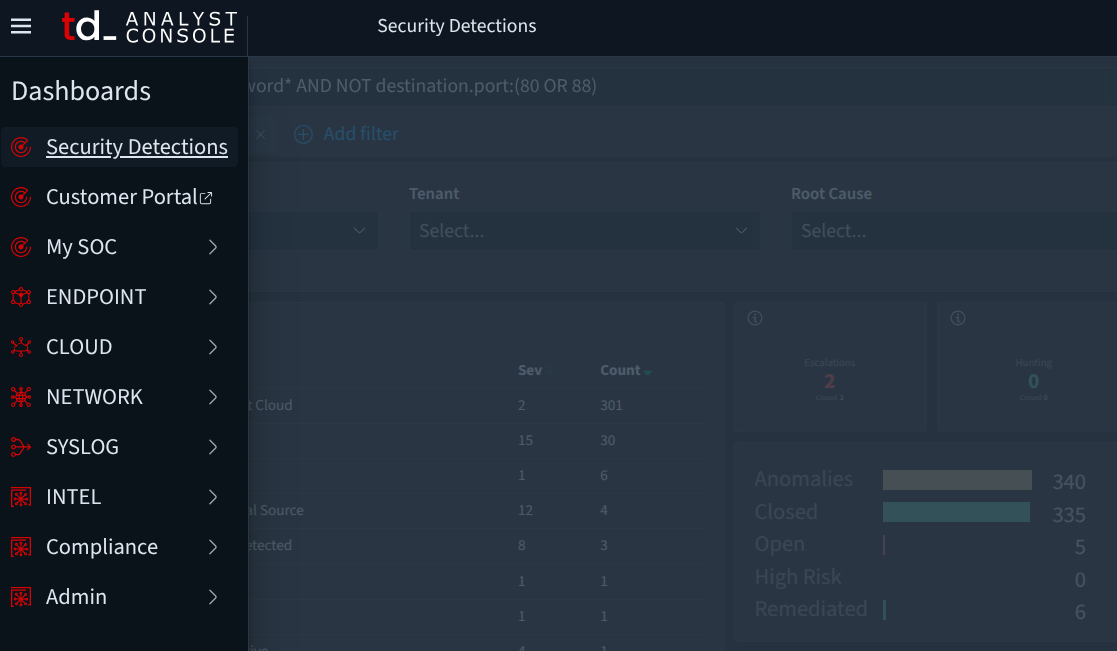
The **Security Detections** dashboard is the main triage hub, consolidating alerts from all data sources. Analysts use it to review, prioritize, and manage detections across the environment.
Other dashboards provide **forensic visibility into specific data sources**. These are useful not only for detecting breaches but also for validating security controls, proving systems are uncompromised, and supporting incident response.
### Dashboards Menu
* **Customer Portal** – High-level reporting and summaries.
* **My SOC** – Preconfigured views for common SOC needs, such as tracking emerging threats and SOC statistics.
* **Endpoint** – Data from DFIR endpoint agents (Windows/Mac/Linux), including system event logs, network connections, logons, and benchmarks (e.g., CIS checks).
* **Cloud** – Audit and assessment events from cloud environments like O365, AWS, and GCP.
* **Network** – Data from ThreatDefence NDR sensors, including flow visibility and network intrusion detections.
***
## Navigation & Filtering
Dashboards include filters and search controls to refine alerts and focus investigations.
### Dashboard Filters and Views
* **Time Range** – Defaults to *Last 24 hours*. Adjust via **Show dates** for custom ranges (e.g., last 30 days).

* **Menu Filters** – Predefined options for narrowing down alerts, including:
* Alert Status (Open, Closed, In Progress)
* Tenant (e.g., threatdefence, tdsoc, acme)
* Data Source (e.g., Keycloak, O365, NDR, Dark Web, Mailgun, google\_workspace.drive)
* Technique (e.g., Indicator, Exploit Public-Facing, Valid Accounts)
* AI Outcome, MSP, Severity, Tags

* **Manual Filters** – Click on visualizations to filter interactively. For complex queries or automation, use text-based Lucene queries.

***
## Key Sections
* **Security Detections Table** – Lists alerts by name and severity. Analysts can sort, filter, and drill into specific alerts.

* **Charts & Aggregations** – Visual breakdowns including:
* Anomalies (e.g., open high-risk alerts)
* Detection Types (spikes, informational, indicators)
* Techniques (e.g., LOGIN\_ERROR, persistence)
* Impacted Sites/Tenants
* Indicators (IPs, domains, geo locations)
* Detection Sources by Severity
* **Top 5 Entities** – Most frequent hosts or users
* **Detections Feed** – A paginated log of all alerts, expandable for full context, interactions, and investigation options.
***
This structured navigation lets analysts move quickly from **high-level monitoring** to **detailed investigations**, reducing response times and improving situational awareness.
---
# Agent Instructions
This documentation is published with GitBook. GitBook is the documentation platform designed so that both humans and AI agents can read, navigate, and reason over technical content effectively. Learn more at gitbook.com.
## Querying This Documentation
If you need additional information that is not directly available in this page, you can query the documentation by asking a question.
Perform an HTTP GET request on the following URL with the `ask` and `goal` query parameters:
```
GET https://docs.threatdefence.com/soc-analyst-guide/platform-navigation.md?ask=&goal=
```
`ask` is the immediate question: it should be specific, self-contained, and written in natural language.
`goal` is what the user is ultimately trying to achieve, the reason they need the answer. Sharing it helps GitBook give you a better, more relevant answer. A goal is most helpful when it describes the outcome the user wants rather than restating the question. For example, with `ask=how do I create an API token`, a goal like `automate deployments from our CI pipeline` lets GitBook tailor the answer to that use case.
The response will contain a direct answer to the question and relevant excerpts and sources from the documentation.
Use this mechanism when the answer is not explicitly present in the current page, you need clarification or additional context, or you want to retrieve related documentation sections.